
Waitlist: Join the List for Sold-Out Items
Missed out on a sold-out item? Join the waitlist and you'll automatically receive it if inventory becomes available — no payment required to join.
How Waitlist Works
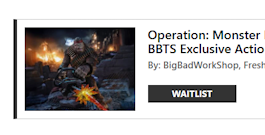
Step 1
Find a sold-out item with a Waitlist button on the product page. You must have at least one paid order with BBTS to be eligible.
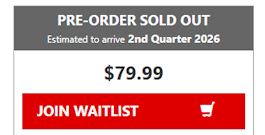
Step 2
Click Join Waitlist, add the item to your cart, and complete checkout. No payment is collected — joining is completely free.
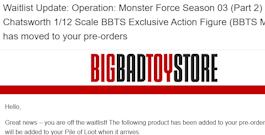
Step 3
If inventory becomes available, we will promote based on a first-on, first-off basis. An email will be sent to you if your spot is promoted. Any non-refundable deposits will be charged at this time.
Who is eligible?
To join any waitlist, you'll need at least one previously paid BBTS order. You may only waitlist for items that you have not already pre-ordered/ordered.
Managing your waitlist items
View and manage all your waitlisted items from the Waitlist page in My Account. You can cancel individual items any time and it won't affect your cancellation rate, since no inventory is allocated and no payment has been made.
What happens when I'm promoted off the waitlist?
If inventory becomes available, we will promote customers in the order they joined, first on, first off. An email will be sent to you if your spot is promoted.
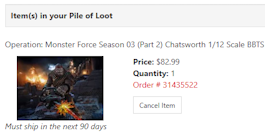
- Pre-Order Sold Out Waitlist: The item will be moved to your pre-orders, and any NRD will be charged. Upon arrival, the item will be added to your Pile of Loot, and the product price will be charged.
- Sold Out Waitlist: The item will be added directly to your Pile of Loot, and the product price will be charged.
Frequently Asked Questions
You're eligible to join a waitlist if you've previously had at least one paid BBTS order. You may only waitlist for items that you have not already pre-ordered/ordered. When a sold-out item has a waitlist, you'll see a Join Waitlist button on its product page. Simply click it, add the item to your cart, and check out. Joining is free and no payment is required. Keep in mind that joining doesn't guarantee you'll receive the item.
Only customers who have previously paid for at least one item with BBTS are eligible to join waitlists. If you believe the error was shown by mistake, please contact our Customer Service team.
Only customers who have previously paid for at least one item with BBTS are eligible to join waitlists. If you believe the error was shown by mistake, please contact our Customer Service team.
No, you may only waitlist an item once, with a quantity of 1.
Not every item has a waitlist. When available for a sold-out product, you'll see a Join Waitlist button on the product page. Please note that while Waitlist may be available for a product, you will not be able to waitlist an item that you have already pre-ordered/ordered.
Yes, that is the only way Waitlist items can be released.
See the Waitlist page within My Account.
Joining a waitlist doesn't guarantee you'll receive the item. If inventory becomes available, we fulfill in waitlist order — and we'll email you if your spot is promoted.
All waitlist items will be added to your Pile of Loot after arrival.
Go to the Waitlist page in My Account and select the item you'd like to remove.
Yes — there is no payment required to join.
Non-refundable deposits (NRDs) are not charged when you join the waitlist. You'll only be charged an NRD if and when your waitlist spot is promoted to an order.
Yes — there is no limit on how many items you can waitlist.
We have a few different tools to help you keep track of items you're interested in. Here's what each one does:
Waitlist
When an item sells out, you may see an option to join the waitlist. Adding yourself to the waitlist gives you the chance of being able to buy the product if it becomes available again. Joining a waitlist does not guarantee you'll get the item.
Notify Me
For certain products that are coming soon, you can click "Notify Me" to get an email alert when it goes live.
Wishlist
Your Wishlist is a personal collection of items you're interested in buying someday. You can add anything to your Wishlist and revisit them anytime from your account. It's great for keeping track of things you want or sharing ideas with friends and family. Items are not reserved.
Save for Later
Save for Later lets you move an item out of your shopping cart but keep it close by. It sits below your cart and can be moved back whenever you're ready to check out. Save for Later items are not reserved.